Web Application Security, by Bryan Sullivan, Vincent Liu

Screenshot from 2018-04-28 09-33-36

I don’t review every book I read, in fact I probably review about 1 in 3. I like to write about the books I found the most useful, and this book is certainly in that list. While it is a technical book, it is written in a conversational tone that made it easy to read. The book is circa 350 pages long and covers topics such as Network Security, Authentication, Authorization, Database Security, Filesystem Security, Same Origin Policy, XSS, and CSRF.

Network Security

The premise of the book is that companies spend a lot of money on security, the bulk of which goes towards securing their networks via firewalls. Most successful attacks however are against their applications directly and are typically authorised by the network. The successful attacks use vulnerabilities in their applications’ logic to make applications run malicious code against themselves. The metaphorical equivalent of hitting yourself intentionally.

Attack Surface

The attack surface of an application is the amount of possible ways there are to attack it. Features that do not get written are not exploitable, but even features that do get written can be written in ways that have optional functionality that can be enabled but that is turned off by default. Login screens with “remember me” buttons are great examples. If sessions are not permanent, the application won’t be exposed to some forms of session hijacking: the attack surface is reduced.

Authentication

Authentication is the process of proving one’s identity. There are three factors to authentication: what you know (password), what you have (passport, authentication code), and who you are (bio-metrics). Most websites use 1 factor auth, but some that need to be more secure use 2 factor auth. The biggest chapter in the book, it covers topics such as password strength, reiterative hashing algorithms, password salting, rainbow tables, and session cookie vs permanent cookies.

Authorization

If authentication is the process of knowing who a user is, authorization is the process of determine if a user has the rights to access specific resources. Be the resource a file, a table or a row in a database, the right to read vs write, etc. Checking for these permissions needs to happen in the business logic.

Same Origin Policy

The browser has strong Same Origin Policies that prevents developers and attackers to read responses from just any AJAX requests, or reading the contents of iframes. One of the reason for this is for example to stop a malicious web author from creating a website that would be able to fetch sensitive information from big banks servers.  Without the Same Origin Policy this might work, as the user’s session cookie would be sent with each request and the banks server.

XSS

Cross Site Scripting should essentially have been named JavaScript Injection, although it is also possible to inject some HTML that can also make HTTP requests such as <img /> and <form /> elements. There are different types of XSS attacks. But they more or less work the same way, they treat data as code and insert it carefully into the page.

CSRF

Cross Site Request Forgery is another popular attack where an attacker makes an HTTP on behalf of the user that modifies data on a service the user is currently authenticated in, the user is then usually unable to read back to the answer because of CORS, but by point the damage has usually been done.

Database Security

It is possible to inject malicious SQL into a database: this is called a SQL Injection attack. This can work when the server does not validate the input it receives, and does not escape it. Fascinatingly, it is also possible to do blind SQL Attacks where the attacker is eventually able to guess the value in entire databases effectively by timing how long it takes for a truthy answer to execute versus an error.

Filesystem Security

Some apps do not manage their file access permissions correctly and this can be possible to exploit. For example if a filename appears in the URL or an <img /> tag of a page an attacker is visiting, he might in some cases be able to easily find other files in the same directory or do a Dot-Dot-Slash attack whereby he is able to explore the whole filesystem.

Secure Software Development Processes

Finally the book touches on secure processes whereby teams bake in security from the start of their creative process rather than as an after thought. Product managers could include a security assessment step in their kanban flows, and CI/CD pipelines could include automated source code checks and black box checks to minimise the risk of dangerous features.

High Performance Browser Networking, by Ilya Grigorik

Screenshot from 2017-10-08 20-45-22


This is a book that was written by Ilya Grigorik who’s a Web Performance Engineer at Google while also a member of W3C Web Performance working group. His book is called High Performance Browser Networking and overall it’s preeetty good. The book was not all that easy to read, but not all that hard either, it’s moderately long at around 400 pages but can be pretty dry at times… I remember in particular that when we were going through the 60 page long history of Wireless networking I was really starting to question my life’s purpose and the meaning of the universe.

The book goes covers a lot of nice topics and concepts though. Most of them we won’t be able to cover entirely in this post, but they are nonetheless fundamental. It starts off with Networking 101: definition of delay and TCP/UDP performance, goes into TLS, then onto both wired and wireless technologies, and finally HTTP, Websockets, Server Side Events and WebRTC.

Here are some of MY key takeaways.


  • Everything should go through a CDN

I have always been able to appreciate the benefits of using for a CDN for static assets such as images/videos, CSS files, JS files, and such. It means that your web servers don’t need to do as much work, and that the assets are globally distributed to be closed to your users.

It turns out that routing ALL your traffic through CDNs can actually be a good idea. The main reason network calls can take a long time for web applications are not so much bandwidth related but latency related. It takes a long time to establish an initial connection to a remote server, it will take at least one full round trip for TCP to establish a connection, and a total of three round trips for a TLS to establish a connection.

Establishing those round trip connections over long distances is costly, the SYN, SYN ACK, ACK, and TLS packets will need to travel a long distance before we can start to send data. But by using a CDN, our users would only need to establish those connections to the closest CDN endpoint which is likely to be much closer than your server. The CDN endpoint will then be able to relay your request and avoid expensive TCP/TLS handshakes by maintaining a pool of long lived open connections.


  • Fun fact: last mile latency is where the delays are at

The main highways of the internet which are maintained by ISP vendors and as public infrastructures are highly efficient fiber optic network with huge bandwidth and latency performances. Where the internet slows done is usually at the last mile, in residential areas, where infrastructure is a lot less efficient: wireless networks, copper wires, and outdated routing and load balancing hardware.
Screenshot from 2017-10-08 21-06-44

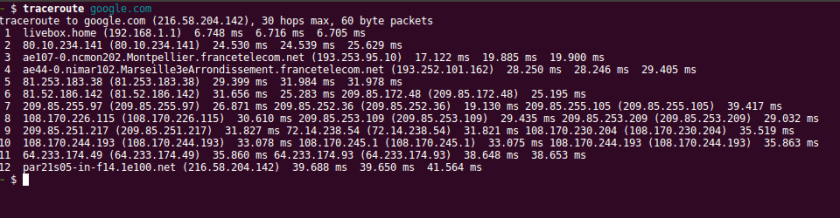
As this traceroute shows, the total it time it takes to reach google is between 39 and 42 ms and there are 12 total hops. But the first hop which connects my computer’s network card to my home’s WiFi router takes a whopping 6 ms, and it then takes another ~ 18 ms to go from my home’s WiFi to what is probably the neighborhood’s router.  Over half of the journey is spend going about 100 meters up the street from where I live.


  • Mobile networking is screwed

While it would be hard for me to tell you with a straight face that I remembered everything the book covered about mobile networking, my take away is that the radio is the second most battery consuming device on the mobile (only beat by a switched on screen) and that many strategies are used to keep it turned off as much as possible. Although mobile network performance is highly variable as a whole, it’s important to realize that it is still slightly predictable: a lot of time is spend on initial requests actually waiting for the radio to wake up, to listen to the local network tower messages, and to connect to the local network tower.

The ideal mobile networking pattern should look something like this: avoid communications if they are not necessary and if they are then do a lot of communication all at once, preferably in one big request. Avoid polling strategies for instances: having to wake the radio up and send data ever so often is going to end up being costly in terms of battery.


  • HTTP 2

HTTP 2 is an improvement on HTTP 1.x not so much because the API or the interface changes – it doesn’t – but rather because the underlying protocol changes. You would still mainly use HTTP 2 the same way you would use HTTP 1.x, you would just get better performance.

All communications to a host are multiplexed on a single TCP connection, meaning that handshakes don’t have to keep being established for each new request and that some head of line blocking issues can be avoided. The head of line issue that can be avoided is when a HTTP request is being held up because of lost packets, which can prevent further HTTP request of happening is the browser has already opened as many HTTP connections at it will be allowed to (it varies but browser will usually maintain up 6 TCP connections open per host).

Headers are not send of every request. Instead, header tables are maintained by the browser and by the server, and only differences in headers are send on new requests. This means that cookies which can be particularly expensive to send on each request only get sent when their content changes.

Another important feature of HTTP 2 is server push. It enables the server to push additional content to the browser when a resource is requested. User requested /index.html? Send him index.html, but also push other files that he will need, such as index.cssindex.js and media files. Why is this nice? Normally browsers would download ​​​index.html, find links to additional content, and THEN send a new request for that content. By using server push we are essentially avoiding a whole round trip of latency. Yes, but I was already avoiding this by inline all of my JS and CSS inside my index.html file, why should I do this? By using server push network proxies and the browser are able to more efficiently cache that extra content exactly because it isn’t inlined and arrives as a separate file.

HTTP 2 was based on the SPDY protocol developed at Google.


  • Polling, Long Polling (Comet), SSE and Websockets

Many different techniques can be used to achieve more or less the same goal: be notified of updates by the browser as soon as they happen. Implementations and performance differ widely though, and some are better in some situations that others.

Polling is asking for information at a fixed interval. Let’s say that every ten seconds the browser makes a HTTP request to the browser. This is perhaps the most naive and simplest approach, it will however generate a lot of unnecessary server traffic if there is nothing to update, and is royally inefficient for mobiles because having to wake the radio up every ten seconds is slow and expensive for the battery.

Long polling, or comet, is like polling but with a twist. Basically the browser sends a request to which the server will only reply if it has any updates. Sometimes there is no data and the server timeout might kick in after 2 minutes or so, at which point the request will be resent by the browser. This is much better than regular polling as it is not as greedy for the browser or the server. And it is also not that much harder to implement. Some servers might suffer with having a lot of simultaneous open connections, and remember that browsers can only maintain 6 open TCP connections per host and that each long polling request will be using one of those TCP connections.

Server Side Events (SSE) is a rather underused browser API that is however supported by a lot of browsers. The interface is very simple, as the browser simply needs to connect to a REST endpoint, and the server will then have to manage an array of open connections.

var source = new EventSource('/event-source-connections/');

What’s nice about EventSource is that it comes with a few nice to have features such as automatic reconnections performed by the browser when a connection is lost. There are JavaScript polyfills for older browsers that do not supported that internally fall back to Long Polling, if your targeted browser can do xhr requests, it can do EventSource.

WebSockets are not quite the same as the three previous techniques as they allow bidirectional communication between the browser and the server. Their interface is also fairly simple, but events such as disconnections have to be managed by the application. WebSockets also introduce state to the server. If a browser is making a request to a server via a reverse load balancing proxy it’s important that the request end up on the same server every time as WebSockets are connection based: this can be trickier than it sounds.  Most WebSockets connections are setup via secure tunnels between the browser and the servers, and some agents over the network may not support WebSockets or behave unexpectedly in their presence. WebSocket polyfills also enable browsers that support xhr to simulate WebSocket behaviour.


There is more good stuff that the book covers. While I still feel that some sections could have been improved or that I felt the absence of any coverage of DNSs, I will still give this book a 5 star rating because the overall content really was in depth, taught me a lot, and has made me a better full stack developer.


Web Scalability for Startup Engineers, by Artur Ejsmont

Screenshot from 2017-09-24 20-32-16

Artur Ejsmont is a guy with a really cool name, and a really cool book. He is also Head of Platform Engineering at Yahoo in Sydney.

Now to the book: it is hard for me to overstate how much relief I felt after reading this book. I am a self taught software developer and I had some serious wholes in my knowledge when it came to architecturing large full stack applications. I had of course come across disjointed articles here and there that covered some of the topics were are about to discuss, but this book simply does an incredible job of tying it all together. It gives the full picture and a much better intuition for how backend concepts are related.

Every line of the book packs knowledge and I had many “aha” moments while reading it. It’s not going to be possible to go into every area that the book covers, but I’m going to do my best at outlining this huge knowledge cloud!


“Front End Layer”

Artur mentions CDNs and caching as two ways to help the front layer scale.

Content Delivery Networks use GeoDNSs to point users to a local node of the network, they are ubiquitously used in web development because they enable a number of interesting benefits. One of the first benefits of CDNs is that they can be used to cache static content (HTML, CSS, JavaScript, fonts, images, videos, audio). This is helpful because your web servers then don’t have to do any work.

The other main benefit of CDNs is that they are closer to the user than your web servers are. Some DNSs have nodes in over 50 different locations over the worlds, and a CDN uses GeoDNS (a DNS service that can interpret to user’s physical location) to route a user to its closest node, drastically reducing latency. I’m going to write another book review shortly about a fantastic networking book I’m reading that goes into more depth about how DNSs drastically improve TCP/TLS latency, by reducing handshake and certificate negotiation times and avoiding the slow start algorithms inherent to TCP communications.

On top of the previously covered HTTP and media caching, the book also talks about browser caching (localStorage). An app can quite easily use localStorage to keep track of the local state of the application, and simply reload the last state when an application is closed and reopened. Google maps for instance might locally persist the latest map, so that the next time the user opens his app, it isn’t blank: there will already be a loaded map.


“Web Services”

The book goes in detail into load balancing. And caching. HTTP caching is of course useful and it avoids having to generate new content. But object caching, application entities that cannot be cached in NGINX, can benefit from being cached in a fast in memory database such as Redis (Redis is particularly useful because it has an expiry flag that can be set for each object).

Keeping web services stateless is vitally important as it enables them to be horizontally scalable: hide any number of servers behind a load balancer, and as long as they are stateless, your application can scale. This enables better scalability than vertical scaling (buying a more and more powerful service to handle all traffic) because there isn’t a limit on the number of web servers you can have. If your load balancer is becoming overwhelmed: use more than one load balancer and use your DNS server to route traffic to each load balancer.


“Data Layer”

The book has the best introduction to SQL scalability that I have come across. The author talks about read replication where multiple read databases reading form a master, to scale reads (but not writes). Master-master replication to improve reliability and avoid downtime. And vertical or horizontal sharding of databases.

Managing distributed SQL databases might be a bit of a hassle though, and the author also talks about some NoSQL databases, their pros and cons. NoSQL databases usually have a harder time guaranteeing ACID transactions, and usually offer a choice between high availability (low latency when getting and editing data) versus high consistency (the retrieved data is always accurate). There are many trade offs ad gotchas that have to be properly understood when designing and using distributed databases (CAP theorem, and more). I have plans to read more about it soon, if it’s any good I’ll be reviewing that too! The pros of NoSQL databases are often that they are able to store Tera to Peta bytes of data.


“Asynchronous Processing”

Ejsmont mainly talks about queues. He mentions that some services are publishers and others are workers. Queuing jobs should help your applications are using resources efficiently and avoid getting overwhelmed. The workers will only take the next job as soon as they are able to. Queues also encourage strong decoupling between parts of your application which is a sign of good engineering.

We have used asynchronous processes at TransferWise to process money orders by making them go through various stages (is there missing information? is the customer verified? is this a potential fraud? does we need to get more information about the recipient? are their enough funds on the account? did the payment go through?). We also use queues at Maple Inside with Google PubSub as part of our Event Driven Architecture.

There are however challenges to queues: it’s something extra to manage and deploy. Queues can sometimes crash if they become overwhelmed. And poisoned messages can systematically crash your whole application because they keep getting sent to new workers after crashing the previous ones.


“Searching for Data”

In one of the last parts of the book, Artur talks about search engines and how they might be useful for some applications. He mentions ElasticSearch in particular – a somewhat new but hot technology. Search engines might take in XML or JSON documents and are then able to efficient search through them. A common pattern for an eCommerce website that sells cars might be to add a new document to ElasticSearch every time a new car is added to the cars database. When a user wants to search for a specific car model, a list is returned by ElasticSearch, and the latest data for each carId is fetched from the cars database.


There is a good deal more information in the book that I haven’t touched on. I’m particularly fond of the book and think it might be one of my favorite books of the year. It should really be recommended reading for any (especially newby) engineers.

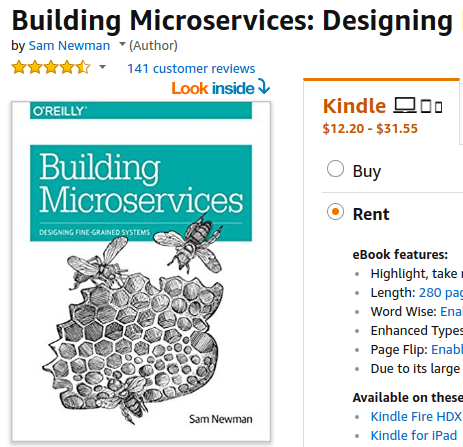
Building Microservices: Designing Fine-Grained Systems, by Sam Newman

Screenshot from 2017-09-24 19-46-09

Microservices are all the rage these days and while I am not sure that they are apt for every product – especially during the early stages – they ARE popular and for good reason.

The Service Oriented Architecture (aka. microservices) have become popular because they enable us to split a monolithic code base into decoupled services, each managed and working independently from another. The parts of the application that need to be scaled can be scaled on their own. And teams can take ownership of specific services.

While I read this book a few months ago, and I was able to appreciate and immediately apply its what now seems like straight-forward principles. I have worked on microservices at TransferWise, and currently at Maple Inside with great success.

Here are some of Sam Newman’s key concepts that were the most important to me:

  • Microservices should be as small as possible, but not smaller
  • It’s very hard to create distributed ACID transactions. 2 Phase Commit is probably one of the better ways to do it if you really wanted to, but it is best to avoid it all together.
  • Microservices are hard


“Microservices should be as small as possible, but no smaller.”

Microservices should be as small as possible, keyword “as possible”. While at first it might be hard to find where the boundaries lie, it’s often possible to split the code base into components with a very limited ranges of responsibility (Netflix has over 900 microservices).

For instance, an eCommerce company might use an email service with a simple interface that takes in a from, to, and a body. The same company might also have an order service that reads and edits orders based on userId. To retrieve an order, you might first have to query your user service for the user (using the user email) and then use that user’s id to make a second request to the order service. Although it will add latency to your app, it shouldn’t add that much time to answer the request with proper database indexes and if your services on the same local area network.

Some services however cannot be split. Or with so much difficulty that it is simply not worth it. Those services are best kept attached together, because they are already as small “as possible”. Read the next section to understand when that might be the case.


“It’s very hard to create distributed ACID transactions. 2 Phase Commit is probably one of the better ways to do it if you really wanted to, but it’s often best to avoid it all together.”

It’s incredibly hard to revert a transaction across multiple services if it fails for whatever reason. I believe the consensus is that it is better to use 2 phase commit if you want to go down the route of having transactions, but 2 phase commits algorithms don’t guarantee ACID transactions, they only increase the likelihood of them succeeding. The way 2 PC works is that it simply checks that every service that needs to be involved in the transaction is able to do the transaction before doing it, thus reducing the risks of a transaction failing.

The best approach is however to not split up parts of your application that require ACID transactions over several areas of responsibility.


“Microservices are hard”

Microservices add complexity: communicating between microservices, deciding which standards to use, understanding where the boundaries lie, making the system resilient, debugging distributed errors, deploying microservices, monitoring, logging, every thing is harder.

In monolith first, Martin Fowler makes the case that is might be preferable for some projects to start off as a monolith. Especially until the project has been confirmed to be useful. The main advantage is the time saved between iterations, and also because their is no need at that point to split a huge monolith up into a SOA. It also gives the team the time to learn more about the domain problem, and gain the domain knowledge that will help them create more stable boundaries between areas of responsibility.


“Other”

The book talks in some detail about problems common to all microservices: logging, monitoring, analytics. Because the application is split up, so are logs, errors, and databases. And as logging, monitoring and analytics are vitally important to production systems, a good deal of thought has to go into how to centralize logs split across multiple services, monitoring multiple services and merging the contents of SQL and NoSQL databases for analytics.

The book also read about the “SOA bus”, which is sort of similar to the CPU bus in the sense that it’s an efficient way to make your parts talk together. At Maple Inside, for instance, we are using Google PubSub and an event driven architecture (EDA) so that services can publish events for other services, and while other services are able to subscribe to specific events. An example might be a user service who publishes a “User Created” event that the email service (and others) might be subscribed to, so that it can send out a welcome email.


All in all it’s one of the best books currently out there about microservices.  It took me about 20 hours to read, and I highly recommend anyone new to the topic to read it.