Scala My Love

About 4 years ago I moved to London and began working at a small startup called Goodlord. We had about 14 engineers when I joined. One of the main reasons for joining the team was that in addition to being incredibly talented, they also had a JVM language on the backend. At the time I had never heard of their backend language but I felt the need to gain exposure to the JVM and its ecosystem in order to become a better engineer and as a foray into backend engineering.

The language they were using was Scala. A fairly flexible language at the crossroads between Java and Haskell, that can support both Object Oriented Programming and Functional Programming.

Learning Scala

My main goal at the company was to shift from frontend development to backend development, and in order to do this I was going to learn Scala and show the team how great I would be at it. Although I didn’t know it at the time, one of the criticisms you often hear about Scala is that it is complex, hard to understand, and hard to learn.

Today, I understand why critics think this is the case but I don’t entirely agree. As opposed to some programming languages such as Java which has an ad hoc building block for your every need, Scala has a few very building blocks. The tools which Scala provides are few but they are very powerful and cleverly designed to fit well together. If it is any indication, the latest version of book Programming in Scala has 668 pages and the latest version of Java The Complete Reference is 1248 pages long.

Scala is considered a powerful language. This means that it gives the programmer more control than other languages do, and it allows programmers to express a lot with only a little. An example of a powerful feature is the type level programming that Scala allows at the compiler level. It allows the programmer to prove to the compiler that his program is correct.

I think that learning difficulties related to Scala aren’t necessarily to do with the language itself, but rather the new concepts and use cases the language is useful for. Working on an enterprise Scala program with no prior Functional Programming knowledge is akin to working on an enterprise Java program with no prior Object Oriented Programming knowledge. You would fail to recognise that the code you are seeing contains implementations of formalized and easily identifiable design patterns.

Scala is elegant and stands on its own. Nut without a doubt, a major benefit programmers would get from learning it is the plethora of Functional Programming concepts they would pick up on along the way.

While Scala newcomers are often recommended to begin learning using Functional Programming in Scala (aka. “the red rook”) I don’t think this is a great place to start. The red book is a masterpiece but it is a difficult and academic read. I would instead recommend the less rigorous but still excellent Functional Programming Simplified book, only to then go onto the series of articles The Neophyte’s Guide To Scala, and finally onto Scala With Cats.


Practicing Scala

Scala represents a very small slice of the industry. The StackOverflow 2021 Survey results showed that Scala programmers represent about 3% of the entire industry. All the while JavaScript is the most widely represented at 65% and Java sits at 36%.

Scala in itself can be considered a niche. But even within the Scala community there are two broad use cases which tend to not cross boundaries. There are those using the language for running Spark jobs, and those using the language for backend microservices services.

While I do not have industry experience with Spark, I have read Spark the Definitive Guide. Spark is a framework which is part of the Apache foundation, that helps companies interact with amounts of data which are too big to fit onto a single computer.

Spark is fairly similar to MapReduce, except that it is considered an improvement on the latter because it is significantly faster. It achieves the speed gains over its competitor by mostly working in memory and saving to disk only when its job’s outputs need to be redistributed among the workers, while MapReduce will save each step of its calculations to disk.

Spark’s backend is written in Scala. Today, it provides clients in many different languages. But originally, it had only a few languages to pick from which included Scala. The JVM client is still the fastest and most powerful one to date as it allows access to lower level constructs than its other clients do.


The other niche Scala has found is for backend development. Teams like the ones I worked in at Goodlord and Babylon, sometimes opt for the language for writing their microservices. In virtue of running on the JVM the language has a fantastic runtime to work on with very good tooling, and Scala programmers can also import with Java libraries without difficulty.

The initial enthusiasm for using Scala on the backend had a lot to do with the Lightbend toolkit. Lightbend provides the Akka toolkit which equips programmers with powerful capabilities to create distributed applications. Akka is to Scala engineers vaguely what Spring Boot is to Java engineers. The most famous features it provides are the Actor System, Streams, and HTTP routing functionality. The Actor System is a particularly interesting way of doing concurrency where each actor has its own non-sharable mutable state, and where actors will communicate via messages and queues.

In recent years, programmers have increasingly decided to embrace a purer form of Functional Programming by going with either TypeLevel or Zio. These are competing libraries that expose the data structures and abstractions to have greater control over side effects. Users will be familiar with their respective IO monad, their HTTP routing, and their streaming features. The IO monad is inspired from Haskell and is a fundamentally sound way of controlling side effects in code such as sending requests over the internet, and reading from the file system.

Closing Thoughts

Learning and working in Scala has been an eye opening and rewarding process for me. It has opened my eyes to the realm of functional programming and to the other wonderful languages which exist out there such as Haskell, Lisp, OCaml, Erlang, and Smalltalk.

I truly wished that more of the industry knew about and embraced Scala. But it doesn’t.

Yet, it is pleasing and optimistic to see the trend that Functional Programming languages are becoming mainstream and also that other mainstream languages are borrowing concepts from Functional Programming.

In the future, I will have to make a choice as to whether I want to allow my love of Scala to govern my career although it might narrow my possibilities, or whether I should be more open minded about trying other languages.

I think it is a choice that practitioners of all beloved yet niche technologies have to face. Should I chose to continue with Scala, then I would at least have the comfort of knowing that I am in good company.

Web Application Security, by Bryan Sullivan, Vincent Liu

Screenshot from 2018-04-28 09-33-36

I don’t review every book I read, in fact I probably review about 1 in 3. I like to write about the books I found the most useful, and this book is certainly in that list. While it is a technical book, it is written in a conversational tone that made it easy to read. The book is circa 350 pages long and covers topics such as Network Security, Authentication, Authorization, Database Security, Filesystem Security, Same Origin Policy, XSS, and CSRF.

Network Security

The premise of the book is that companies spend a lot of money on security, the bulk of which goes towards securing their networks via firewalls. Most successful attacks however are against their applications directly and are typically authorised by the network. The successful attacks use vulnerabilities in their applications’ logic to make applications run malicious code against themselves. The metaphorical equivalent of hitting yourself intentionally.

Attack Surface

The attack surface of an application is the amount of possible ways there are to attack it. Features that do not get written are not exploitable, but even features that do get written can be written in ways that have optional functionality that can be enabled but that is turned off by default. Login screens with “remember me” buttons are great examples. If sessions are not permanent, the application won’t be exposed to some forms of session hijacking: the attack surface is reduced.

Authentication

Authentication is the process of proving one’s identity. There are three factors to authentication: what you know (password), what you have (passport, authentication code), and who you are (bio-metrics). Most websites use 1 factor auth, but some that need to be more secure use 2 factor auth. The biggest chapter in the book, it covers topics such as password strength, reiterative hashing algorithms, password salting, rainbow tables, and session cookie vs permanent cookies.

Authorization

If authentication is the process of knowing who a user is, authorization is the process of determine if a user has the rights to access specific resources. Be the resource a file, a table or a row in a database, the right to read vs write, etc. Checking for these permissions needs to happen in the business logic.

Same Origin Policy

The browser has strong Same Origin Policies that prevents developers and attackers to read responses from just any AJAX requests, or reading the contents of iframes. One of the reason for this is for example to stop a malicious web author from creating a website that would be able to fetch sensitive information from big banks servers.  Without the Same Origin Policy this might work, as the user’s session cookie would be sent with each request and the banks server.

XSS

Cross Site Scripting should essentially have been named JavaScript Injection, although it is also possible to inject some HTML that can also make HTTP requests such as <img /> and <form /> elements. There are different types of XSS attacks. But they more or less work the same way, they treat data as code and insert it carefully into the page.

CSRF

Cross Site Request Forgery is another popular attack where an attacker makes an HTTP on behalf of the user that modifies data on a service the user is currently authenticated in, the user is then usually unable to read back to the answer because of CORS, but by point the damage has usually been done.

Database Security

It is possible to inject malicious SQL into a database: this is called a SQL Injection attack. This can work when the server does not validate the input it receives, and does not escape it. Fascinatingly, it is also possible to do blind SQL Attacks where the attacker is eventually able to guess the value in entire databases effectively by timing how long it takes for a truthy answer to execute versus an error.

Filesystem Security

Some apps do not manage their file access permissions correctly and this can be possible to exploit. For example if a filename appears in the URL or an <img /> tag of a page an attacker is visiting, he might in some cases be able to easily find other files in the same directory or do a Dot-Dot-Slash attack whereby he is able to explore the whole filesystem.

Secure Software Development Processes

Finally the book touches on secure processes whereby teams bake in security from the start of their creative process rather than as an after thought. Product managers could include a security assessment step in their kanban flows, and CI/CD pipelines could include automated source code checks and black box checks to minimise the risk of dangerous features.

How Browsers Work

I really enjoy the typical CS101 classes like exploring and understanding Operating Systems. Every piece of software ever made runs on an OS at some level. Servers run directly on an OS, desktop apps run on an OS, frontend apps run on browsers that run on an OS, etc.

For someone like me who likes to work on web apps I thought it would be useful to learn some about the inner workings of web browsers. Basically, I had gleaned bits and trinkets of information here and there about how browsers might perform internally, but by and large I didn’t feel like I wasn’t holding the whole picture.

I now feel a lot more confident in my understanding of how browsers work and consider it a very interesting topic even if it’s oft left unexplored. In my quest for understanding it struck me that there isn’t existing document out there. The main ideas I will talk about come from the excellent book length article originally written by Tali Garsiel, and later improved upon by Paul Irish, called How Browsers Work. Most of the readily available information about browser internals mostly revolves around webkit (open source NIX project adopted and use mainly by Apple) and gecko (Mozilla) and so the blog post might be more skewed towards that.

The whole journey has given me more appreciation towards standardised browsers specs and the browser engineering community!

Parsing Files

Browsers have to parse a lot of different files. CSS, HTML, JavaScript, JSON, XML, XHTML, PDF, medias, etc.

It was certainly interesting to learn about how for strict/context-free languages such as XML and CSS browsers are able to use lexer generators such as Flex to tokenize the file, and a parser generator such as Bison to build an AST. There are essentials tools that take in regex and other formal definitions/rules to ultimately build the parse tree you can easily use.

For HTML on the other hand it is not possible to use such tools because HTML is very forgiving. It can have unclosed tags, missing tags, badly named tags and just bad syntax in general, and the browser will do it’s best to understand what is going on and how the best fix the syntax errors. Lexer and Parser generators don’t work well to address these problems, and so what browsers might do is decide to implement a stateful tokenizer, eg. if we are already in an “opened tag” state interpret the following input as X, but if we are in a “between two tags” state parse the following input as Y.

Rendering

DOM

The DOM means Document object model and it is the JavaScript tree representation of all the nodes inside the document. It will contain even node types that are not rendered to the screen such as Node.COMMENT_NODE elements,  elements, and elements with display: none or opacity: 0. The DOM is fairly interesting in its own right, it’s a live object and an actual in-JS representation of the freaking document (!) but it’s fairly well understood too.

CSSOM

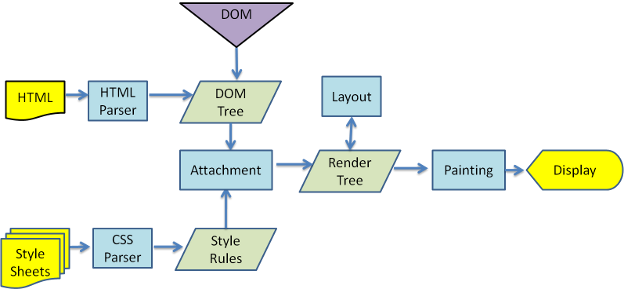
This is where things start to get interesting. The CSSOM would be the “Style Rules” section in the flow chart above. Essentially after the browser parses all the CSS files it will be build one or many Style Context trees that it will use to apply styles to the DOM, to create the Render Tree. Browsers differ on implementations and naming convention a lot here. But what it comes down to is essentially generating one or many CSSOM trees derived from the stylesheets. Often these trees only include native CSS selectors ,


, etc. and do not include CSS selectors such as classes and ids that are more easily written/read to/from hash maps.

Below is an example of what a naive CSSOM might look like.

Render Tree

The render tree is attaching the CSSOM to the DOM. The DOM is traversed and styles are applied to each element. The render tree has a very similar structure to the DOM, but because it is only used for rendering it does not include nodes that do not need to be rendered: , nodes with the display: none rule, etc. It’s at the Render Tree stage that concepts such as deciding which CSS rule is more specific (CSS Specificity) and which rule should be inherited (Cascading) comes into play.

Layout

The step that comes after building the Render Tree is the Layout. This step is tasked with positioning elements on screen. CSS concepts such as Display Modes, the Box Model, and Stacking Contexts come into play in this step.

The browser will start by layout element with the highest stacking context, and start by rendering children within each one of those.

The video below is only 27 seconds long and gives you a pretty good idea of what happens during the layout step. It does also cover the Painting step which we are going to talk about next.

Painting

This is the stage where the layout is filled in with backgrounds, borders, fonts, etc. Just like the layout step, this step can be global (paint the whole Render Tree) or incremental (paint only a changed portion of the Render Tree). This incremental process is enabled by the tree nodes having their dirty flags toggled.

Further Reading

There’s a great deal that could be expanded upon here. Some of these concepts have helped me better understand why the browser might behave the way it does in some circumstances (collapsing margins, stacking contexts).

This area is quite important to understand why browsers operate the way they do and that means that it’s quite important for browser performance. Google Developers has got a good series about the Critical Rendering Path which is all about how to structure the application for a faster first render.

Stack Overflow Developer Survey 2017 Insights for Remote Developers

Screenshot from 2018-02-11 19-26-29.png

Every year Stack Overflow does a Developer Survey where they ask their regular readers, those who might have a minute to spare in particular, to answer a few questions. In 2017 there were a total of 154 questions and over 60000 participants. It is one of the biggest community data-sets out there and luckily for us they published the results.

If you would like to query this data-set for yourself, it is possible. There is an easy to run MySQL project available at https://github.com/AzuObs/stack-overflow-survey.

In this article I’ll be going over some of the key insights gained form an afternoon of querying.

You might need to consider becoming an independent to work remotely.

Screenshot from 2018-02-11 15-47-25

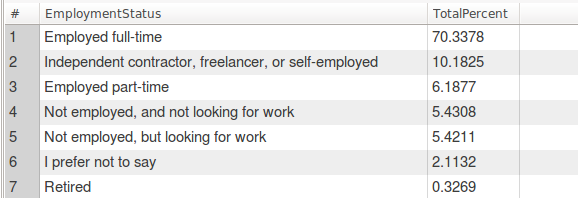
Fig A Employment Status for non-remotes

Fib A  is the information we have about ALL developers who took part in the survey. The majority of people are full time employees, and there is a big step between those who are working as full time employees and those who have different situations such as being contractors.

Screenshot from 2018-02-11 15-47-12

Fig B Employment Status for remotes

Fig B contains the information about developers who have declared working remotely “All or almost all the time (I’m full time remote)”. By the way, this will be the way how I decide to categorise remote vs non-remote people throughout this article. We can see that a much higher percentage of people who work remotely do so by working independently rather than being in full time employment.

Screenshot from 2018-02-11 19-57-10

Fig C Employment Status for non-USA remotes

Fig C shows the trend is even more pronounced if we only consider non-USA based remotes. I assume that is probably because most overseas people who want to work for a US company do so as contractors so as to not require a visa. Whereas most of the US remotes are able to work as full time employees for most companies anywhere in the US. Personally, I’ve worked remotely before, and I indeed had to setup my own company because I was living in France and my employer (Maple Inside) were hiring me from Canada.

Working as an independent might have some downsides. Two that come to mind are that by working remotely you might therefor have less job security, and that independents will incur added responsibilities of running a formal business (company meetings, taxes, and all sorts of paperwork).

Personally, and having worked remotely previously, I would be very confident that these downsides would not outweigh to pros of decoupling my job market from my living place, having more independence, and enjoying more freedom.

Remote workers earn MORE on average their their non-remote counterpart

Screenshot from 2018-02-11 16-49-33

Average Earnings for non-remotes by country

Screenshot from 2018-02-11 16-49-08

Average Earnings for remotes by country

These results speak for themselves but could be seen as surprising. Remote workers are often working from rural places with a low cost of living and in globally competitive job market, yet they earn more. For US remote worker this could be because remote jobs attract more mature employees who have a lot of experience and might have chosen the remote lifestyle to offer a better quality of life to their families. For non-US remote workers this could perhaps be explained by those nationals who were able to work at higher rates for US based companies. US companies offering typically better compensation.

Remote workers don’t think remote collaboration is as hard as their office dwelling counterparts

Screenshot from 2018-02-11 15-47-51

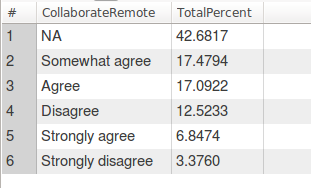
“Is remote collaboration hard?” answer by non-remotes

Screenshot from 2018-02-11 15-48-05

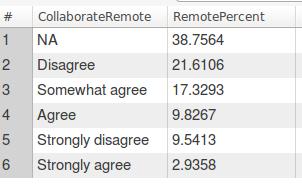
“Is remote collaboration hard?” answered by remote

Here remotes would much more often disagree with the statement “Remote collaboration is hard”.

Remote collaboration is undoubtedly one of the big challenges remote companies must consider when deciding to hire remote workers. But it would seem that some have found ways to make it work effectively. Nowadays excellent tools such as Slack, Google Hangouts, Google Docs, Trello, and cheap international flights make remote collaboration effortless.

Remote jobs are not only for US residents, although it might be easier for US residents

Screenshot from 2018-02-11 15-49-34

Work country of all workers

Screenshot from 2018-02-11 15-49-25

Work country of remote workers

Many remote roles are advertised as US-only. It should often be easier for US companies to hire US residents because the laws would be less awkward to work with than legal systems of entirely different countries. It turns out that out of all survey takers 22% were from the US, whereas 26% of the remote-only survey takers were from the US. So while an observation could be made that remote opportunities are probably more abundant for US citizens, it might not be that significant.

Other insights

The Stack Overflow data-set is full of wonderful eye opening insights and gives the opportunity to answer questions about the remote lifestyle numerically. I may have put forward the above, but there are more insights to be gained. Stack Overflow has made a survey summary of their own where you can find more information https://insights.stackoverflow.com/survey/2017.

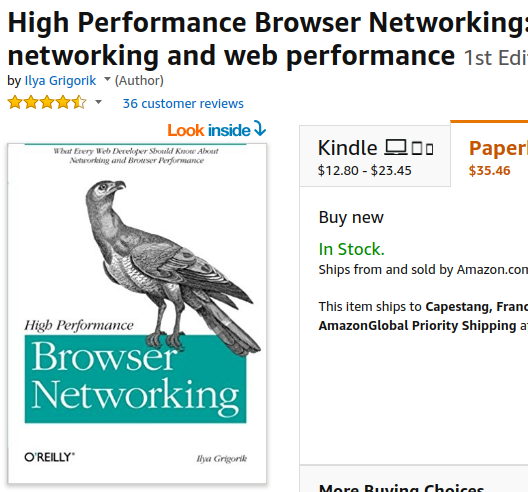
High Performance Browser Networking, by Ilya Grigorik

Screenshot from 2017-10-08 20-45-22


This is a book that was written by Ilya Grigorik who’s a Web Performance Engineer at Google while also a member of W3C Web Performance working group. His book is called High Performance Browser Networking and overall it’s preeetty good. The book was not all that easy to read, but not all that hard either, it’s moderately long at around 400 pages but can be pretty dry at times… I remember in particular that when we were going through the 60 page long history of Wireless networking I was really starting to question my life’s purpose and the meaning of the universe.

The book goes covers a lot of nice topics and concepts though. Most of them we won’t be able to cover entirely in this post, but they are nonetheless fundamental. It starts off with Networking 101: definition of delay and TCP/UDP performance, goes into TLS, then onto both wired and wireless technologies, and finally HTTP, Websockets, Server Side Events and WebRTC.

Here are some of MY key takeaways.


  • Everything should go through a CDN

I have always been able to appreciate the benefits of using for a CDN for static assets such as images/videos, CSS files, JS files, and such. It means that your web servers don’t need to do as much work, and that the assets are globally distributed to be closed to your users.

It turns out that routing ALL your traffic through CDNs can actually be a good idea. The main reason network calls can take a long time for web applications are not so much bandwidth related but latency related. It takes a long time to establish an initial connection to a remote server, it will take at least one full round trip for TCP to establish a connection, and a total of three round trips for a TLS to establish a connection.

Establishing those round trip connections over long distances is costly, the SYN, SYN ACK, ACK, and TLS packets will need to travel a long distance before we can start to send data. But by using a CDN, our users would only need to establish those connections to the closest CDN endpoint which is likely to be much closer than your server. The CDN endpoint will then be able to relay your request and avoid expensive TCP/TLS handshakes by maintaining a pool of long lived open connections.


  • Fun fact: last mile latency is where the delays are at

The main highways of the internet which are maintained by ISP vendors and as public infrastructures are highly efficient fiber optic network with huge bandwidth and latency performances. Where the internet slows done is usually at the last mile, in residential areas, where infrastructure is a lot less efficient: wireless networks, copper wires, and outdated routing and load balancing hardware.

Screenshot from 2017-10-08 21-06-44

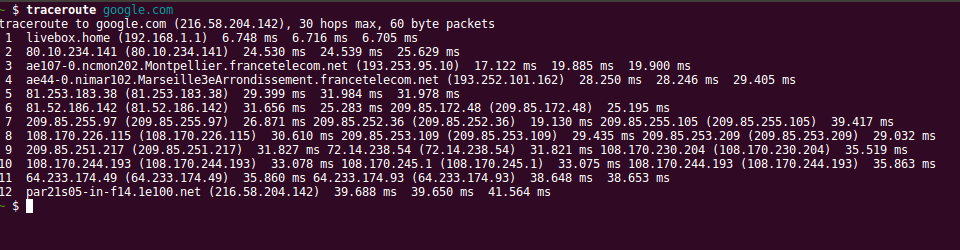
As this traceroute shows, the total it time it takes to reach google is between 39 and 42 ms and there are 12 total hops. But the first hop which connects my computer’s network card to my home’s WiFi router takes a whopping 6 ms, and it then takes another ~ 18 ms to go from my home’s WiFi to what is probably the neighborhood’s router.  Over half of the journey is spend going about 100 meters up the street from where I live.


  • Mobile networking is screwed

While it would be hard for me to tell you with a straight face that I remembered everything the book covered about mobile networking, my take away is that the radio is the second most battery consuming device on the mobile (only beat by a switched on screen) and that many strategies are used to keep it turned off as much as possible. Although mobile network performance is highly variable as a whole, it’s important to realize that it is still slightly predictable: a lot of time is spend on initial requests actually waiting for the radio to wake up, to listen to the local network tower messages, and to connect to the local network tower.

The ideal mobile networking pattern should look something like this: avoid communications if they are not necessary and if they are then do a lot of communication all at once, preferably in one big request. Avoid polling strategies for instances: having to wake the radio up and send data ever so often is going to end up being costly in terms of battery.


  • HTTP 2

HTTP 2 is an improvement on HTTP 1.x not so much because the API or the interface changes – it doesn’t – but rather because the underlying protocol changes. You would still mainly use HTTP 2 the same way you would use HTTP 1.x, you would just get better performance.

All communications to a host are multiplexed on a single TCP connection, meaning that handshakes don’t have to keep being established for each new request and that some head of line blocking issues can be avoided. The head of line issue that can be avoided is when a HTTP request is being held up because of lost packets, which can prevent further HTTP request of happening is the browser has already opened as many HTTP connections at it will be allowed to (it varies but browser will usually maintain up 6 TCP connections open per host).

Headers are not send of every request. Instead, header tables are maintained by the browser and by the server, and only differences in headers are send on new requests. This means that cookies which can be particularly expensive to send on each request only get sent when their content changes.

Another important feature of HTTP 2 is server push. It enables the server to push additional content to the browser when a resource is requested. User requested /index.html? Send him index.html, but also push other files that he will need, such as index.cssindex.js and media files. Why is this nice? Normally browsers would download ​​​index.html, find links to additional content, and THEN send a new request for that content. By using server push we are essentially avoiding a whole round trip of latency. Yes, but I was already avoiding this by inline all of my JS and CSS inside my index.html file, why should I do this? By using server push network proxies and the browser are able to more efficiently cache that extra content exactly because it isn’t inlined and arrives as a separate file.

HTTP 2 was based on the SPDY protocol developed at Google.


  • Polling, Long Polling (Comet), SSE and Websockets

Many different techniques can be used to achieve more or less the same goal: be notified of updates by the browser as soon as they happen. Implementations and performance differ widely though, and some are better in some situations that others.

Polling is asking for information at a fixed interval. Let’s say that every ten seconds the browser makes a HTTP request to the browser. This is perhaps the most naive and simplest approach, it will however generate a lot of unnecessary server traffic if there is nothing to update, and is royally inefficient for mobiles because having to wake the radio up every ten seconds is slow and expensive for the battery.

Long polling, or comet, is like polling but with a twist. Basically the browser sends a request to which the server will only reply if it has any updates. Sometimes there is no data and the server timeout might kick in after 2 minutes or so, at which point the request will be resent by the browser. This is much better than regular polling as it is not as greedy for the browser or the server. And it is also not that much harder to implement. Some servers might suffer with having a lot of simultaneous open connections, and remember that browsers can only maintain 6 open TCP connections per host and that each long polling request will be using one of those TCP connections.

Server Side Events (SSE) is a rather underused browser API that is however supported by a lot of browsers. The interface is very simple, as the browser simply needs to connect to a REST endpoint, and the server will then have to manage an array of open connections.

var source = new EventSource('/event-source-connections/');

What’s nice about EventSource is that it comes with a few nice to have features such as automatic reconnections performed by the browser when a connection is lost. There are JavaScript polyfills for older browsers that do not supported that internally fall back to Long Polling, if your targeted browser can do xhr requests, it can do EventSource.

WebSockets are not quite the same as the three previous techniques as they allow bidirectional communication between the browser and the server. Their interface is also fairly simple, but events such as disconnections have to be managed by the application. WebSockets also introduce state to the server. If a browser is making a request to a server via a reverse load balancing proxy it’s important that the request end up on the same server every time as WebSockets are connection based: this can be trickier than it sounds.  Most WebSockets connections are setup via secure tunnels between the browser and the servers, and some agents over the network may not support WebSockets or behave unexpectedly in their presence. WebSocket polyfills also enable browsers that support xhr to simulate WebSocket behaviour.


There is more good stuff that the book covers. While I still feel that some sections could have been improved or that I felt the absence of any coverage of DNSs, I will still give this book a 5 star rating because the overall content really was in depth, taught me a lot, and has made me a better full stack developer.

Web Scalability for Startup Engineers, by Artur Ejsmont

Screenshot from 2017-09-24 20-32-16

Artur Ejsmont is a guy with a really cool name, and a really cool book. He is also Head of Platform Engineering at Yahoo in Sydney.

Now to the book: it is hard for me to overstate how much relief I felt after reading this book. I am a self taught software developer and I had some serious wholes in my knowledge when it came to architecturing large full stack applications. I had of course come across disjointed articles here and there that covered some of the topics were are about to discuss, but this book simply does an incredible job of tying it all together. It gives the full picture and a much better intuition for how backend concepts are related.

Every line of the book packs knowledge and I had many “aha” moments while reading it. It’s not going to be possible to go into every area that the book covers, but I’m going to do my best at outlining this huge knowledge cloud!


“Front End Layer”

Artur mentions CDNs and caching as two ways to help the front layer scale.

Content Delivery Networks use GeoDNSs to point users to a local node of the network, they are ubiquitously used in web development because they enable a number of interesting benefits. One of the first benefits of CDNs is that they can be used to cache static content (HTML, CSS, JavaScript, fonts, images, videos, audio). This is helpful because your web servers then don’t have to do any work.

The other main benefit of CDNs is that they are closer to the user than your web servers are. Some DNSs have nodes in over 50 different locations over the worlds, and a CDN uses GeoDNS (a DNS service that can interpret to user’s physical location) to route a user to its closest node, drastically reducing latency. I’m going to write another book review shortly about a fantastic networking book I’m reading that goes into more depth about how DNSs drastically improve TCP/TLS latency, by reducing handshake and certificate negotiation times and avoiding the slow start algorithms inherent to TCP communications.

On top of the previously covered HTTP and media caching, the book also talks about browser caching (localStorage). An app can quite easily use localStorage to keep track of the local state of the application, and simply reload the last state when an application is closed and reopened. Google maps for instance might locally persist the latest map, so that the next time the user opens his app, it isn’t blank: there will already be a loaded map.


“Web Services”

The book goes in detail into load balancing. And caching. HTTP caching is of course useful and it avoids having to generate new content. But object caching, application entities that cannot be cached in NGINX, can benefit from being cached in a fast in memory database such as Redis (Redis is particularly useful because it has an expiry flag that can be set for each object).

Keeping web services stateless is vitally important as it enables them to be horizontally scalable: hide any number of servers behind a load balancer, and as long as they are stateless, your application can scale. This enables better scalability than vertical scaling (buying a more and more powerful service to handle all traffic) because there isn’t a limit on the number of web servers you can have. If your load balancer is becoming overwhelmed: use more than one load balancer and use your DNS server to route traffic to each load balancer.


“Data Layer”

The book has the best introduction to SQL scalability that I have come across. The author talks about read replication where multiple read databases reading form a master, to scale reads (but not writes). Master-master replication to improve reliability and avoid downtime. And vertical or horizontal sharding of databases.

Managing distributed SQL databases might be a bit of a hassle though, and the author also talks about some NoSQL databases, their pros and cons. NoSQL databases usually have a harder time guaranteeing ACID transactions, and usually offer a choice between high availability (low latency when getting and editing data) versus high consistency (the retrieved data is always accurate). There are many trade offs ad gotchas that have to be properly understood when designing and using distributed databases (CAP theorem, and more). I have plans to read more about it soon, if it’s any good I’ll be reviewing that too! The pros of NoSQL databases are often that they are able to store Tera to Peta bytes of data.


“Asynchronous Processing”

Ejsmont mainly talks about queues. He mentions that some services are publishers and others are workers. Queuing jobs should help your applications are using resources efficiently and avoid getting overwhelmed. The workers will only take the next job as soon as they are able to. Queues also encourage strong decoupling between parts of your application which is a sign of good engineering.

We have used asynchronous processes at TransferWise to process money orders by making them go through various stages (is there missing information? is the customer verified? is this a potential fraud? does we need to get more information about the recipient? are their enough funds on the account? did the payment go through?). We also use queues at Maple Inside with Google PubSub as part of our Event Driven Architecture.

There are however challenges to queues: it’s something extra to manage and deploy. Queues can sometimes crash if they become overwhelmed. And poisoned messages can systematically crash your whole application because they keep getting sent to new workers after crashing the previous ones.


“Searching for Data”

In one of the last parts of the book, Artur talks about search engines and how they might be useful for some applications. He mentions ElasticSearch in particular – a somewhat new but hot technology. Search engines might take in XML or JSON documents and are then able to efficient search through them. A common pattern for an eCommerce website that sells cars might be to add a new document to ElasticSearch every time a new car is added to the cars database. When a user wants to search for a specific car model, a list is returned by ElasticSearch, and the latest data for each carId is fetched from the cars database.


There is a good deal more information in the book that I haven’t touched on. I’m particularly fond of the book and think it might be one of my favorite books of the year. It should really be recommended reading for any (especially newby) engineers.

Building Microservices: Designing Fine-Grained Systems, by Sam Newman

Screenshot from 2017-09-24 19-46-09

Microservices are all the rage these days and while I am not sure that they are apt for every product – especially during the early stages – they ARE popular and for good reason.

The Service Oriented Architecture (aka. microservices) have become popular because they enable us to split a monolithic code base into decoupled services, each managed and working independently from another. The parts of the application that need to be scaled can be scaled on their own. And teams can take ownership of specific services.

While I read this book a few months ago, and I was able to appreciate and immediately apply its what now seems like straight-forward principles. I have worked on microservices at TransferWise, and currently at Maple Inside with great success.

Here are some of Sam Newman’s key concepts that were the most important to me:

  • Microservices should be as small as possible, but not smaller
  • It’s very hard to create distributed ACID transactions. 2 Phase Commit is probably one of the better ways to do it if you really wanted to, but it is best to avoid it all together.
  • Microservices are hard


“Microservices should be as small as possible, but no smaller.”

Microservices should be as small as possible, keyword “as possible”. While at first it might be hard to find where the boundaries lie, it’s often possible to split the code base into components with a very limited ranges of responsibility (Netflix has over 900 microservices).

For instance, an eCommerce company might use an email service with a simple interface that takes in a from, to, and a body. The same company might also have an order service that reads and edits orders based on userId. To retrieve an order, you might first have to query your user service for the user (using the user email) and then use that user’s id to make a second request to the order service. Although it will add latency to your app, it shouldn’t add that much time to answer the request with proper database indexes and if your services on the same local area network.

Some services however cannot be split. Or with so much difficulty that it is simply not worth it. Those services are best kept attached together, because they are already as small “as possible”. Read the next section to understand when that might be the case.


“It’s very hard to create distributed ACID transactions. 2 Phase Commit is probably one of the better ways to do it if you really wanted to, but it’s often best to avoid it all together.”

It’s incredibly hard to revert a transaction across multiple services if it fails for whatever reason. I believe the consensus is that it is better to use 2 phase commit if you want to go down the route of having transactions, but 2 phase commits algorithms don’t guarantee ACID transactions, they only increase the likelihood of them succeeding. The way 2 PC works is that it simply checks that every service that needs to be involved in the transaction is able to do the transaction before doing it, thus reducing the risks of a transaction failing.

The best approach is however to not split up parts of your application that require ACID transactions over several areas of responsibility.


“Microservices are hard”

Microservices add complexity: communicating between microservices, deciding which standards to use, understanding where the boundaries lie, making the system resilient, debugging distributed errors, deploying microservices, monitoring, logging, every thing is harder.

In monolith first, Martin Fowler makes the case that is might be preferable for some projects to start off as a monolith. Especially until the project has been confirmed to be useful. The main advantage is the time saved between iterations, and also because their is no need at that point to split a huge monolith up into a SOA. It also gives the team the time to learn more about the domain problem, and gain the domain knowledge that will help them create more stable boundaries between areas of responsibility.


“Other”

The book talks in some detail about problems common to all microservices: logging, monitoring, analytics. Because the application is split up, so are logs, errors, and databases. And as logging, monitoring and analytics are vitally important to production systems, a good deal of thought has to go into how to centralize logs split across multiple services, monitoring multiple services and merging the contents of SQL and NoSQL databases for analytics.

The book also read about the “SOA bus”, which is sort of similar to the CPU bus in the sense that it’s an efficient way to make your parts talk together. At Maple Inside, for instance, we are using Google PubSub and an event driven architecture (EDA) so that services can publish events for other services, and while other services are able to subscribe to specific events. An example might be a user service who publishes a “User Created” event that the email service (and others) might be subscribed to, so that it can send out a welcome email.


All in all it’s one of the best books currently out there about microservices.  It took me about 20 hours to read, and I highly recommend anyone new to the topic to read it.

World of Math Part 2 (Pre-Calc)

It’s been a while since I last wrote, but I have continued learning math in my absence. I made it beyond pre-calculus on Khan Academy, and am almost finished with calculus at the time of writing.

It has been an enriching journey, and I have learnt a lot, and refreshed a lot. Particularly applicable to my day to day job are vectors, matrices, and logarithms and exponentials. All of which are important math concepts to know when designing algorithms.

There were also a few other concepts, that while not applicable to every day CS, were great to learn. The unit circle (trigonometry) and differentiation/integration (calculus).

It took me about 3 months studying 20 hours per week to complete all content on Khan Academy up to Calculus.

The journey continues, although I may take a break after completing calculus to study aspects to CS a bit more relevant to my day to day job.

World of Math Part 1

So I decided that I wanted to brush up on my math. I feel like for a software engineer math is not as important as for a computer scientist, but since I would like to become a well rounded software person I should still be good at both.

Through high school I was quite good at math especially in the early grades but, probably not because I couldn’t but rather because I was too lazy, I started to accumulate holes or gaps in my understanding to eventually led onto wider and wider gaps because math builds on top of what one already understands. At University I was mainly bad at math, understanding only glimpses of the theorems I saw thanks mainly to intuition.

Since I have now had a good introduction to full stack software engineering, databases, operating systems, and data structures and algorithms. I think that it is a great time to focus on the more theory heavy topic of math. Note that I don’t want to become good at all math, but I do want to become good at high school math and computer science math. Enough to be able to show off during interviews and to not fall behind when reading an advanced article or whitepaper would be nice.

In terms of high school math, Khan Academy has me covered. I had volunteered briefly with the organisation when they were looking for English to French translators a few years ago. It was a mission with Khan Academy and Library Sans Frontieres. I’m not sure how useful I was back then, but I helped to review a few history videos. All this to say that Khan Academy has always appealed to me I didn’t think I would end up being a customer!

Khan Academy has a great K-2 through K-12 math curriculum and tests to take. You can watch lessons, earn points and badges, and it also has a practice and mastery system. You can practice any lessons you wish by taking tests. You can then attempt to master your lessons by taking mastery tests, these tests can earn you points towards your mastery but also lose you points if you fail – making it important to double check answers to mastery questions.

The system is well designed, and you can tell (and I’ve read) that there is an AI behind it that forces you to learn topics in the order it thinks best and won’t let you attempt to master certain topics until it thinks you have practiced them enough. You can take mastery challenges on average every 8 hours.

Math by grade vs Math by subject

progress.png

I have completed all K-2 through K-8 math, but need to master a bit more of the K-8 topics. You may noticed that I also have a bit of Algebra and Geometry under my belt. This is partly because when I first discovered the site, I started thought that it would be good to study By Subject. I didn’t realize that K-2 to K-8 meant because we have a completely different education system in France where we learn by grade throughout high school. But it turns out that in America they learn first by grade from K-2 to K-8, and in senior high school they learn their math by subject.

It was a real big surprise for me to go from Early Math to Arithmetic and Algebra, I thought the learning curve was quite steep there for a moment! But it is best to start by completing the math by grade, and then move onto completing the math by subject.

I think this is maybe a bit confusing for people like me who are not from the US. The math by age should the left hand side column and the math by subject should be the right hand side column. And perhaps there should be some sort of intuitive visual guide or notice when the website can detect that you are from countries other than the US.

Rate of Progression

rate-of-progress

I read posts on quora about that tried to estimate the time it would take someone to complete the World of Math challenge on Khan Academy (100% math mastery) and the consensus was that it could take from 11 years to 15 hours depending on one’s skill level in Math and motivation.

How much time World of Math?

How long does it take to do World of Math?

Most the top posts on reddit.com/r/Khan also concern the World of Math challenge and try to estimate its time to completion.

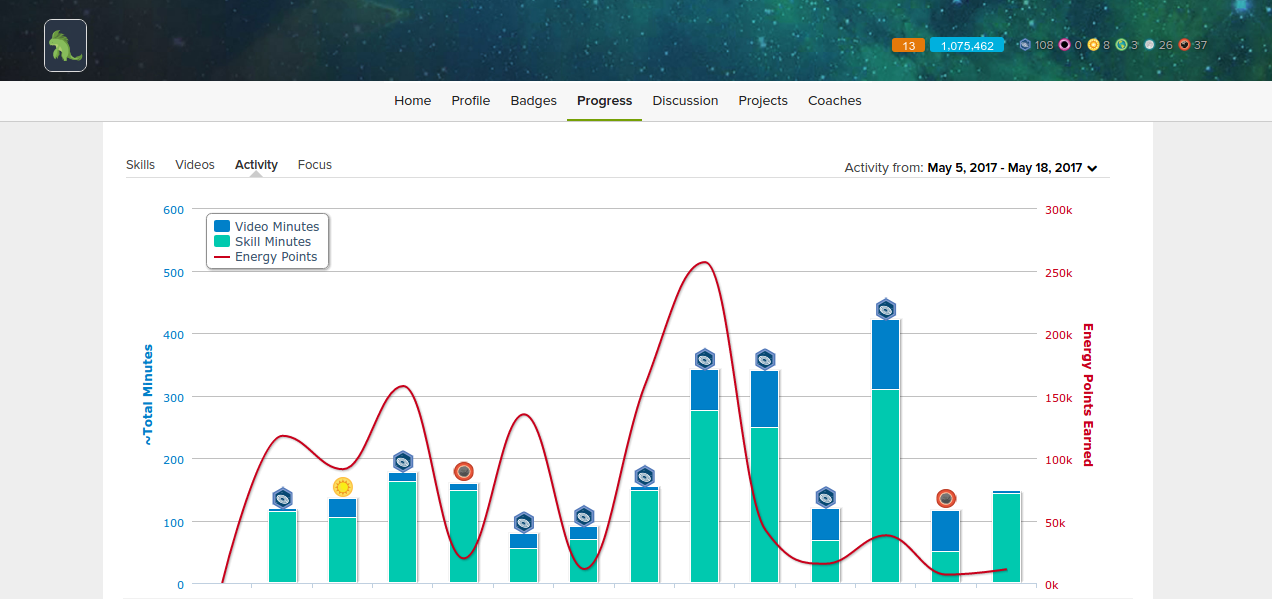
So far the graph above will show that I have spent 39.2 hours on the World of Math mission. This doesn’t account for all the time I have spent on the challenge outside the website: asking for help on forums such as r/learnmath, and learning from articles and videos on youtube – which is probably another 5 hours.

My current completion of the mission is 58%.

The progression is however not linear. It is very easy to progress through the mission at first. But you can see that the more I have been progressing, the more videos I have been watching and the slower by pace has been.

I am about to tackle more involved topics such as Algebra I & II, Calculus, Statistics and Probabilities, Trigonometry, and then advanced topics such as Linear Algebra and Differential Equations. I know a bit of each of those topics, but although K-2 K-8 was mostly revision, I think that it will take me much longer to go through the rest of these lessons because it will actually involved a lot of learning – and learning takes time.

I imagine that in 1 to 9 months from now I will have seen the light at the end of the tunnel and maybe even continued onto discrete math which is a University level math class considered very useful for computer scientists.

Icing on the cake

Got a mill’ points in the bank and 13 day streak, whoop whoop.

My journey to get my first job

Back in 2011 I graduated with a reasonably good Computer Science degree from University of Abertay Dundee. Towards the end of my studies, the financial crisis was in full swing in the UK, and I realized that I although I was technically competent, I wanted to gain experience in a field that would push and develop my business and people skills – universal skills that have wide applications in life. I joined the Oxylane group as a manager, and learnt a lot of valuable life lessons during my years at the company.

Fast forward to 2014 and it had then been a few years since I had seen the inside of a compiler,  although the principles and understanding of computer science were still there and will probably always be with me.

However, my coding skills were rusty and I was going to have to relearn a lot. I took a good look at where the software industry was at before creating a learning plan. Web development was the hot thing at the time, with people coming out of 3 month bootcamps able to find jobs in the Silicon Valley for $100’000.

I didn’t really have the money for a bootcamp, as the ones I looked at costed around $10’000 in tuition and were all almost exclusively in high cost of life areas such as New York and Los Angeles. But as it turns out, one doesn’t need to attend university or bootcamps to get a job in the industry, and I already knew that because I knew quite a lot of software developers didn’t have a degree.

Since I already had the credential of holding a degree, I chose to go the self-taught route and study at my own pace during my spare time.


“The research part”

The first part was making sure I wasn’t wasting my time, as my goal was quite clearly to get a foot in the door as a software developer. I spent weeks researching and reading up on the industry and its various entry paths. Luckily, if one wants a career in programming, there are many ways to get one’s foot in the door.

At the time, React existed but was not as widely adopted as it is today. Ruby on Rails was popular but starting to fade. And the MEAN stack was growing in popularity, the Angular ecosystem in particular was revolutionizing frontend development.

The learning plan I came up with included revisiting some important CS fundamentals including Operating System, Networking, Data Structure and Algorithms. And also becoming familiar with the MEAN stack by building a high quality portfolio of one or two polished applications. I still believe that one really good application with interesting design and implementation decisions is going to be more impressive, and a better talking piece during interviews, than building many lesser quality apps.


“The learning part”

I learnt from any resource I could find. Of which there are many. My focus was mainly on online courses, tutorials and books.

Keeping my time expectations in check that was by far the hardest aspect of this adventure for me. My mind was fixated on the smashing the “learning plan”, and I wanted it learn it all right there and then! Learning is painfully slow if one is too focused on the day to day progress, it’s much better to take a look at one’s progress after a couple months of learning, because learning takes times.

From my experience and from the others testimonies that I have read, it can take anywhere from 3 to 24 months of learning to land a coding job as a self-taught developer – depending on prior experience and location. I still feel like 12-24 months is the most reasonable target one should set himself: plenty of time to learn things in detail while not going overboard.

One of the pitfalls of learning can be that beyond two years it becomes easy to not be able to see the forest for the trees. There is no end to the amount that you can learn about and you need a cutoff point or will you get lost, and you will lose sight out your outcomes. That is why your learning plan is important: it should clearly set out your goals.

Be careful of “goal creep” however. Goal creep is adding more goals to your original plan that might not add that much value.

It took me 2 years all in all or around 2000 hours. Despite my prior knowledge and degree, it took so long because I wanted to feel very comfortable in my new trade before getting a job and actually be able to make meaningful contributions to my team rather than having to struggle at the beginning.


The Portfolio”

Simply put, you are probably not going to find a job doing something you cannot demonstrate you are already capable of doing.

I made a first good polished application, my Kanban app. Kanbans are a type of time management tool, invented by Japanese car manufacturer Toyota to keep track of the various stages of their projects. If you want to know what a Kanban looks like check out Trello, my app was an almost identical clone that had a “The Simpsons” themed to it.

I also had a second polished application. I made a lightweight version of AngularJS. It is still to this day one of my proudest realizations, and it took 3 months of full time devotion to complete. This is the project that really made me into a better programmer simply because popular open source projects tend to be incredibly well engineered and one because there is a lot to learn from studying and contributing to them.


“Outcome”

Because I had a solid learning plan, didn’t try to take shortcuts in learning and didn’t add more goals, I was able to accomplish my goal in the time I had forecasting.

My junior-level portfolio was excellent and once I was ready to start searching, it was the easiest time I had ever had finding a job. All sorts of interesting opportunities came my way.

This experience has perhaps more importantly given me the skills and methodology needed to keep on self-learning throughout my career. It was a huge undertaking and has made me noticeably more confident in myself.

I eventually decided on taking up an Full Stack Developer internship position at TransferWise in Tallinn. After which I had the option to work at the Quebecer startup studio Maple Inside where I currently work as a Full Stack Developer on an ongoing basis.